When a customer rings asking, “How did my WOF go?”, reception should already have the answer.
In a busy New Zealand workshop, the person carrying out the WOF inspection is often not the person dealing with the customer. Owners, service managers and reception staff need clear information so they can answer questions, prepare estimates and keep work moving.
With the itsallauto.com eWOF system, reception can see WOF status and results in real time instead of waiting for a paper checksheet to arrive at the front desk.
See WOF Status in Real Time
Reception can see which WOF inspections are underway and view the results as they become available.
Therefore, reception people can log in on computers at “no cost” to view the status of your customers’ WOFs, as shown in the screenshot below. You click on the rego to open the check sheet.
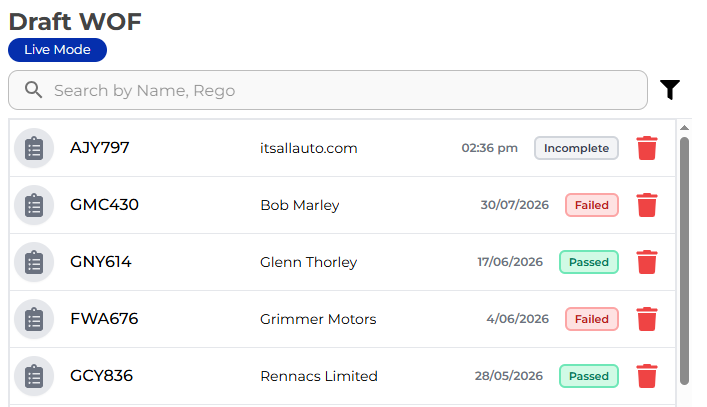
That means your front desk has better visibility of what is happening in the workshop without having to repeatedly ask the inspector for an update.
For owners and service managers, it also provides a clearer overview of WOF work moving through the garage.
Clear WOF Failures Without Trying to Read Handwriting
A handwritten WOF checksheet can create another problem: understanding exactly what the inspector has written.
Electronic WOF checksheets remove the handwriting.
With itsallauto.com eWOF, inspectors can select clear failure options from dropdown menus when recording inspection results.
Reception sees the same clear information.
That means less time asking questions such as:
- “What does this say?”
- “Which tyre failed?”
- “What exactly did you mean here?”
- “What do I need to put on the estimate?”
The inspector records the information once, and the people who need it can access it.
Photos Help Reception Understand the Failure
Photos can also be attached to WOF items.
This gives reception and service staff additional information when they are looking at a failed inspection.
Instead of receiving a piece of paper with a short handwritten note, they can see the recorded failure along with supporting photos where they have been added.
That can make it easier to understand the issue before speaking with the customer or preparing the next step.
Instant Access to Passed and Failed WOF Checksheets
Once a WOF is completed, authorised staff can access the electronic checksheet without searching through paperwork.
Whether the vehicle has passed or failed, reception can quickly access the completed WOF checksheet.
From there, they can:
- Print the completed WOF checksheet
- Email the checksheet to the customer
- Review passed and failed inspection results
- View recorded photos and failure information
- Generate an estimate from the WOF results
This gives the front desk the information it needs while allowing the WOF inspector to continue working.
Better Visibility for the Whole Workshop
Electronic WOF checksheets are not only about making life easier for the inspector.
They can improve the flow of information between the workshop and front office as well.
The technician carries out the inspection and records the results.
Reception can see what is happening.
The service manager can review the result.
The owner has better visibility of WOF activity.
And when the customer calls, the information is already there.
One WOF Record, Available to the People Who Need It
A good workshop system should reduce the need to pass information from person to person.
With itsallauto.com eWOF, WOF information is recorded electronically, clearly and in one place.
No handwriting to decipher. No waiting for the paper checksheet. No unnecessary questions just to find out where a WOF is up to.
Owners, service managers and reception team get real-time visibility of every WOF with itsallauto.com eWOF.